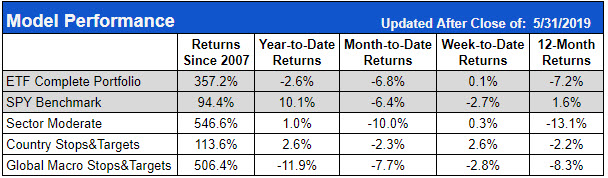
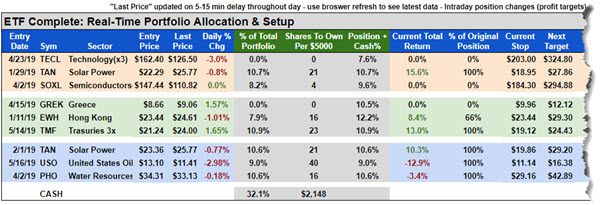
Our real-time portfolio allocation calculator can be found on the “Tools” section of the model member area on the website. The image above is found in all of the Sector models. It presents the three holdings for each of the model variants, some performance data, and information (green columns) about the real-time allocation of the model and some recommended share totals based on that allocation.
The Complete portfolio can have a maximum of 9 positions, so the real-time portfolio allocation and setup section for that model divides the percentage between all 9 possible positions and cash. Each of the sector models only have three positions that are roughly equal sized aside from the drift that can occur between rebalancing.
The first green column shows each position and the percentage of the total portfolio it occupies. This is useful for starting a new portfolio. Once you have determined how much capital you are going to use to trade the model, you can easily divide the capital by the individual position percentage to figure out how much capital should go into each position. If you are trading $10,000 and the position is 10% of the total portfolio, that position should be about $1,000.
The second green column goes one step further and shows the sample number of shares to buy for each position if you started with a $5,000 portfolio. Most people following along won’t necessarily have exactly a $5,000 portfolio. There are two primary ways that you use the information we provided to calculate exactly how many shares to buy for any sized portfolio.
For easy round numbers, like $10,000 or $20,000, the math to figure out how many shares to buy isn’t that difficult. A $10,000 portfolio is exactly double the $5,000 sample portfolio, so all you would have to do is double the share totals shown in the sample table and your $10,000 portfolio would be apportioned correctly. $20,000 is four times larger than $5,000, so for that portfolio it would be a matter of multiplying the shares totals by four.
We have an additional downloadable tool that will calculate the exact number of shares for any custom-sized account in our trade tracking excel workbook, though that requires some knowledge and familiarity with Microsoft Excel.
Next week, we will cover more information about how to start a portfolio and other considerations as you trade alongside the models.